
Remove columns from a table
The Remove columns from a table helper enables the removal of selected columns from a table.
Common use-cases
Clean up a large dataset by removing unnecessary columns
Make your data more manageable and relevant to your analysis or report
Select the table, and its columns will appear in a multi-select dropdown. From this dropdown, select the column or columns you want to remove.
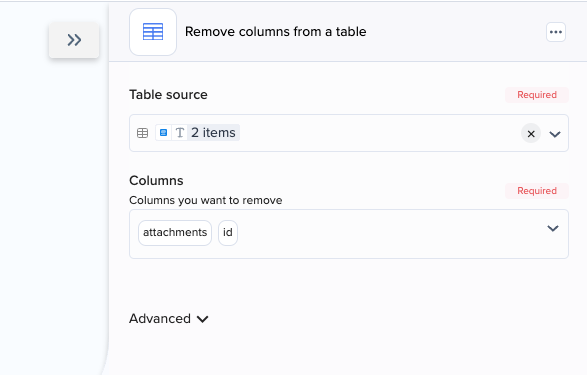
Example 1 - Cleaning a dataset
You have a table that contains columns for "Name", "Email", "Phone number", "Address", “Attachments”, and “ID”. Let's say you would like to remove the "Attachments" and "ID" columns.
Step-by-step instructions
Input the table into "Table source"
Select the columns to remove from the "Columns" dropdown and test the step.
The step output is a table containing only the remaining columns.
Input
John
john@mail.com
1234567890
1st Street
Photo
1
Mary
mary@mail.com
0987654321
2nd Street
Video
2
Output, after removing "Attachments" and "ID" columns
John
john@mail.com
1234567890
1st Street
Mary
mary@mail.com
0987654321
2nd Street
Last updated