
Connection modes
Per user connections let users connect their app accounts to a shared feature – this lets them use the feature with their personal data
Overview
Sharing a feature with another user lets them use it. The default app connection mode is One-for-all. If you share a feature with one-for-all connections, your teammates will use all of the app connections that the feature creator connected.
Different connection modes, like per user mode, allow your teammates to use different connections.
Per user connections
If you want users to connect their own account when using a feature, you need to use per user connections for the relevant steps in the feature.
When you share a feature with per-user connections, users will need to go through a quick setup process where they connect their own accounts for the chosen app.
How to create a per-user connection for a step
Adjust connections when sharing
If you share a feature with an action that we've flagged as requiring a per-user connection (e.g. Gmail's "Send an email" or Slack's "Send a message"), you'll be prompted to reassign its connection to be per-user if it's not already so:
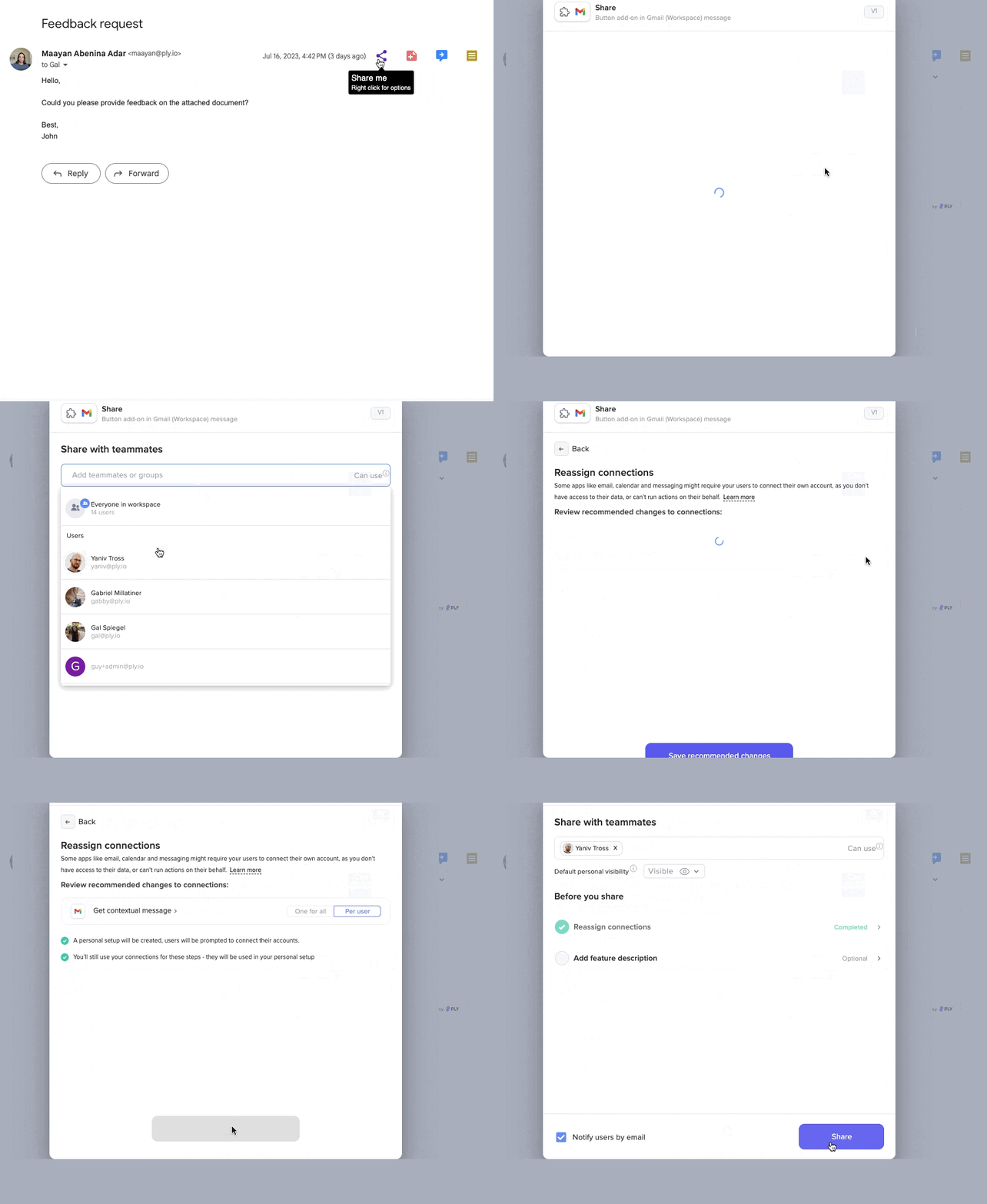
Create a per-user connection in the builder
You can also create per-user connections for any step in a workflow.
Maybe you want your workflow to pay attention to which user token is used to perform an action. Or maybe your integration has certain user-based quotas, and you want each user to use their own token.
In that case, follow these instructions to change the step's connection type:
Create a new step or go to an existing step with a connection.
Click the three dots and choose Edit Step Setup.
Next to the connection, click Connection Options.
In the dropdown, choose Per User Connection
User experience
After creating a per user connection, two things will happen:
Setup created: If you don't already have it, Ply will create a setup for the feature. This appears above the first step in your feature.
Connection block added: You'll be prompted to create a connection block for your setup. The connection block appears in the setup that every user will see, allowing them to connect their own account.
When you share a feature that has a per user connection, the connection you established will only be used for your activities. Other users will be prompted to connect their own account before they use the feature for the first time.
If a user does not establish a connection for a specific app, they will be unable to run the feature, as those steps rely solely on their connection.
Last updated